Check PC compatibility
Check PC compatibility. Compare the information published for the exact item and keep the product name or SKU for reference.
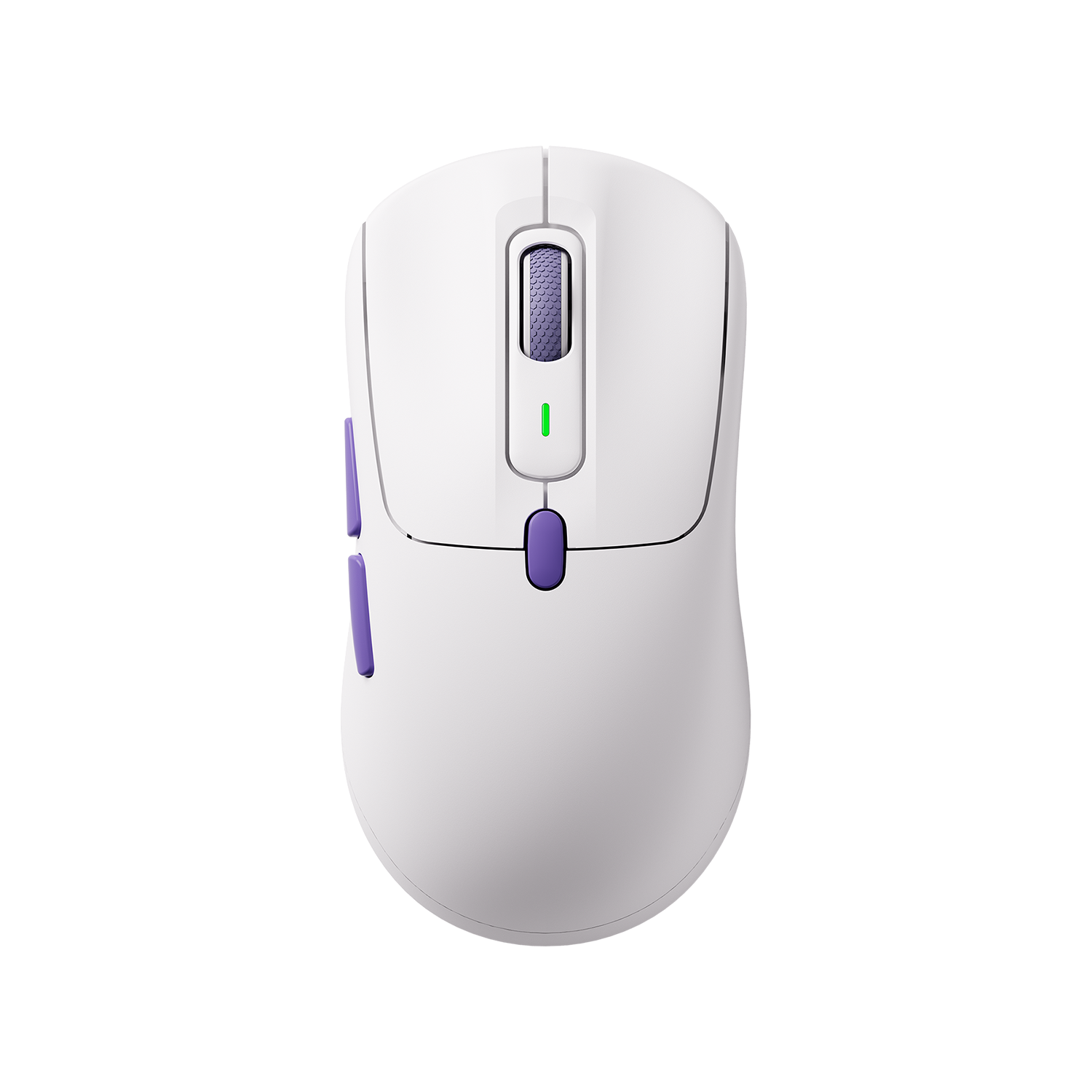
$59.99
Out of stock
Free standard US shipping
Contiguous 48 states & DC · 4–7 business days total
30-day returns
Merchant-paid return shipping. Read the policy
Questions about this item? [email protected]
The details
[et_pb_section fb_built=”1″ _builder_version=”4.16″ custom_padding=”0px||||false|false” global_colors_info=”{}”][et_pb_row _builder_version=”4.16″ background_size=”initial” background_position=”top_left” background_repeat=”repeat” width=”100%” custom_padding=”0px||0px||false|false” global_colors_info=”{}”][et_pb_column type=”4_4″ _builder_version=”4.16″ custom_padding=”|||” global_colors_info=”{}” custom_padding__hover=”|||”][et_pb_wc_breadcrumb _builder_version=”4.16″ global_colors_info=”{}”][/et_pb_wc_breadcrumb][et_pb_wc_cart_notice _builder_version=”4.16″ global_colors_info=”{}”][/et_pb_wc_cart_notice][/et_pb_column][/et_pb_row][et_pb_row column_structure=”1_2,1_2″ _builder_version=”4.16″ background_size=”initial” background_position=”top_left” background_repeat=”repeat” width=”100%” custom_padding=”0px||||false|false” global_colors_info=”{}”][et_pb_column type=”1_2″ _builder_version=”4.16″ custom_padding=”|||” global_colors_info=”{}” custom_padding__hover=”|||”][et_pb_wc_images _builder_version=”4.16″ global_colors_info=”{}”][/et_pb_wc_images][/et_pb_column][et_pb_column type=”1_2″ _builder_version=”4.16″ custom_padding=”|||” global_colors_info=”{}” custom_padding__hover=”|||”][et_pb_wc_title _builder_version=”4.16″ global_colors_info=”{}”][/et_pb_wc_title][et_pb_wc_rating _builder_version=”4.16″ global_colors_info=”{}”][/et_pb_wc_rating][et_pb_wc_price _builder_version=”4.16″ global_colors_info=”{}”][/et_pb_wc_price][et_pb_wc_add_to_cart _builder_version=”4.16″ global_colors_info=”{}”][/et_pb_wc_add_to_cart][et_pb_wc_meta _builder_version=”4.16″ global_colors_info=”{}”][/et_pb_wc_meta][et_pb_wc_description _builder_version=”4.16″ global_colors_info=”{}”][/et_pb_wc_description][/et_pb_column][/et_pb_row][/et_pb_section][et_pb_section fb_built=”1″ _builder_version=”4.22.1″ _module_preset=”default” background_color=”RGBA(255,255,255,0)” custom_margin=”||-59px|||” global_colors_info=”{}”][et_pb_row _builder_version=”4.22.1″ _module_preset=”default” custom_margin=”-45px||||false|false” custom_margin_tablet=”-65px||||false|false” custom_margin_phone=”-75px||||false|false” custom_margin_last_edited=”on|phone” global_colors_info=”{}”][et_pb_column type=”4_4″ _builder_version=”4.22.1″ _module_preset=”default” global_colors_info=”{}”][et_pb_text _builder_version=”4.22.1″ _module_preset=”default” text_font=”Poppins|700|||||||” text_font_size=”50px” text_font_size_tablet=”40px” text_font_size_phone=”29px” text_font_size_last_edited=”on|phone” global_colors_info=”{}”]
Precision Performance, Refined Comfort
[/et_pb_text][/et_pb_column][/et_pb_row][et_pb_row _builder_version=”4.22.1″ _module_preset=”default” global_colors_info=”{}”][et_pb_column type=”4_4″ _builder_version=”4.22.1″ _module_preset=”default” global_colors_info=”{}”][et_pb_image src=”https://www.monsgeek.com/wp-content/uploads/2025/12/pulse01-mouse1-1-1-scaled.avif” alt=”pulse01 mouse1 (1) (1)” title_text=”pulse01 mouse1 (1) (1)” align=”center” _builder_version=”4.22.1″ _module_preset=”default” border_radii=”on|20px|20px|20px|20px” global_colors_info=”{}”][/et_pb_image][et_pb_text _builder_version=”4.22.1″ _module_preset=”default” text_font=”Poppins||||||||” text_font_size=”17px” text_orientation=”center” custom_padding=”||0px|||” global_colors_info=”{}”]
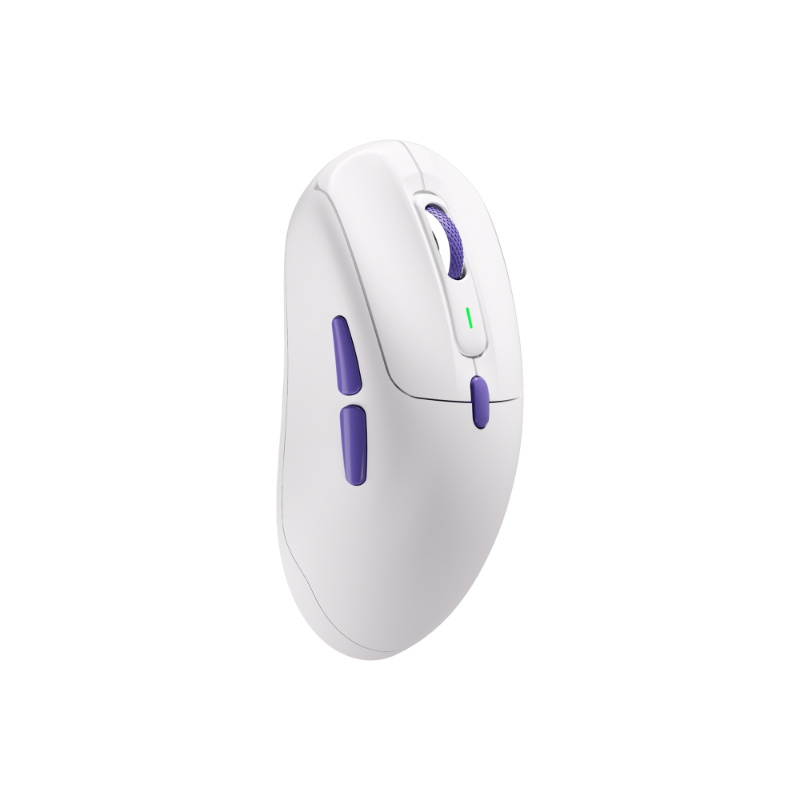
Pulse 01
combines
ultra-low-latency performance
with a
carefully sculpted ergonomic design
, ensuring comfort, responsiveness, and control for every user.
[/et_pb_text][/et_pb_column][/et_pb_row][et_pb_row _builder_version=”4.22.1″ _module_preset=”default” global_colors_info=”{}”][et_pb_column type=”4_4″ _builder_version=”4.22.1″ _module_preset=”default” global_colors_info=”{}”][et_pb_text _builder_version=”4.22.1″ _module_preset=”default” text_font=”Poppins||||||||” text_font_size=”17px” header_font=”Poppins||||||||” header_2_font=”Poppins||||||||” header_3_font=”Poppins||||||||” global_colors_info=”{}”]
Ergonomic Design for Comfortable Palm Fit
[/et_pb_text][et_pb_image src=”https://www.monsgeek.com/wp-content/uploads/2025/12/Pulse01-XQ-CT-SS-GX.gif” alt=”Pulse01-XQ-CT-SS-GX” title_text=”Pulse01-XQ-CT-SS-GX” align=”center” _builder_version=”4.22.1″ _module_preset=”default” width=”80%” border_radii=”on|15px|15px|15px|15px” global_colors_info=”{}”][/et_pb_image][et_pb_text _builder_version=”4.22.1″ _module_preset=”default” text_font=”Poppins||||||||” text_font_size=”17px” text_line_height=”2em” header_font=”Poppins||||||||” header_2_font=”Poppins||||||||” header_3_font=”Poppins||||||||” global_colors_info=”{}”]
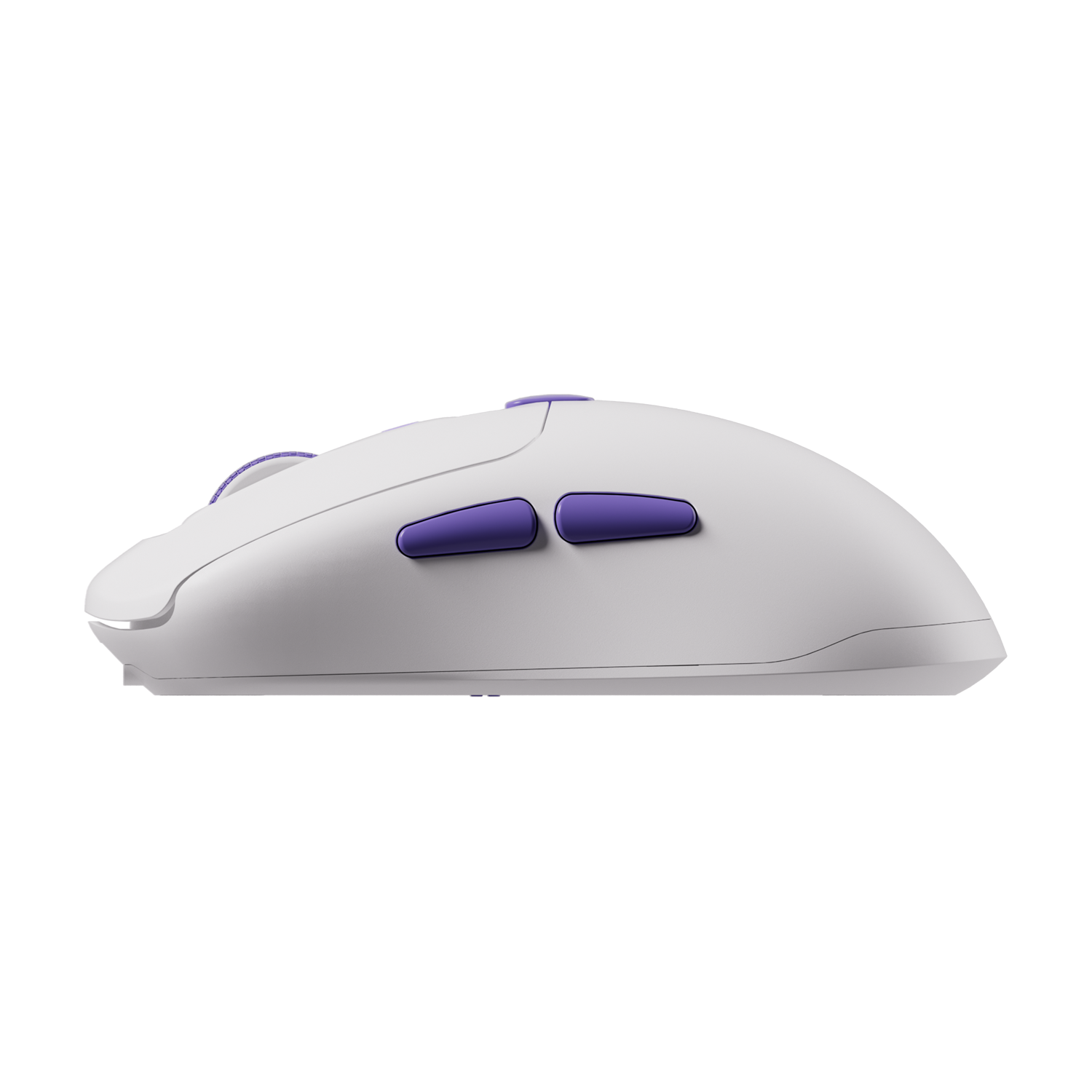
The sculpted shape ensures a comfortable, secure grip—even for larger hands—reducing fatigue during long gaming sessions while delivering smooth, responsive control.
[/et_pb_text][/et_pb_column][/et_pb_row][et_pb_row column_structure=”1_2,1_2″ _builder_version=”4.22.1″ _module_preset=”default” global_colors_info=”{}”][et_pb_column type=”1_2″ _builder_version=”4.22.1″ _module_preset=”default” global_colors_info=”{}”][et_pb_image src=”https://www.monsgeek.com/wp-content/uploads/2025/12/pulse01-mouse-12-scaled.avif” alt=”pulse01 mouse 12″ title_text=”pulse01 mouse 12″ _builder_version=”4.22.1″ _module_preset=”default” border_radii=”on|20px|20px|20px|20px” global_colors_info=”{}”][/et_pb_image][et_pb_text _builder_version=”4.22.1″ text_font=”Poppins||||||||” text_font_size=”17px” text_line_height=”2em” header_font=”Poppins||||||||” header_2_font=”Poppins|800|||||||” header_2_font_size=”30px” header_2_line_height=”1.5em” header_3_font=”Poppins||||||||” header_4_font=”||||||||” max_width=”520px” max_width_tablet=”700px” max_width_phone=”700px” max_width_last_edited=”off|desktop” module_alignment=”center” custom_margin=”|||” custom_margin_tablet=”|0px||” custom_margin_phone=”|0px||” custom_margin_last_edited=”off|desktop” custom_padding=”20px|||” header_2_font_size_tablet=”30px” header_2_font_size_phone=”20px” header_2_font_size_last_edited=”on|phone” border_color_all=”RGBA(255,255,255,0)” border_width_top=”2px” locked=”off” inline_fonts=”Poppins” global_colors_info=”{}”]
Tri-mode Connectivity
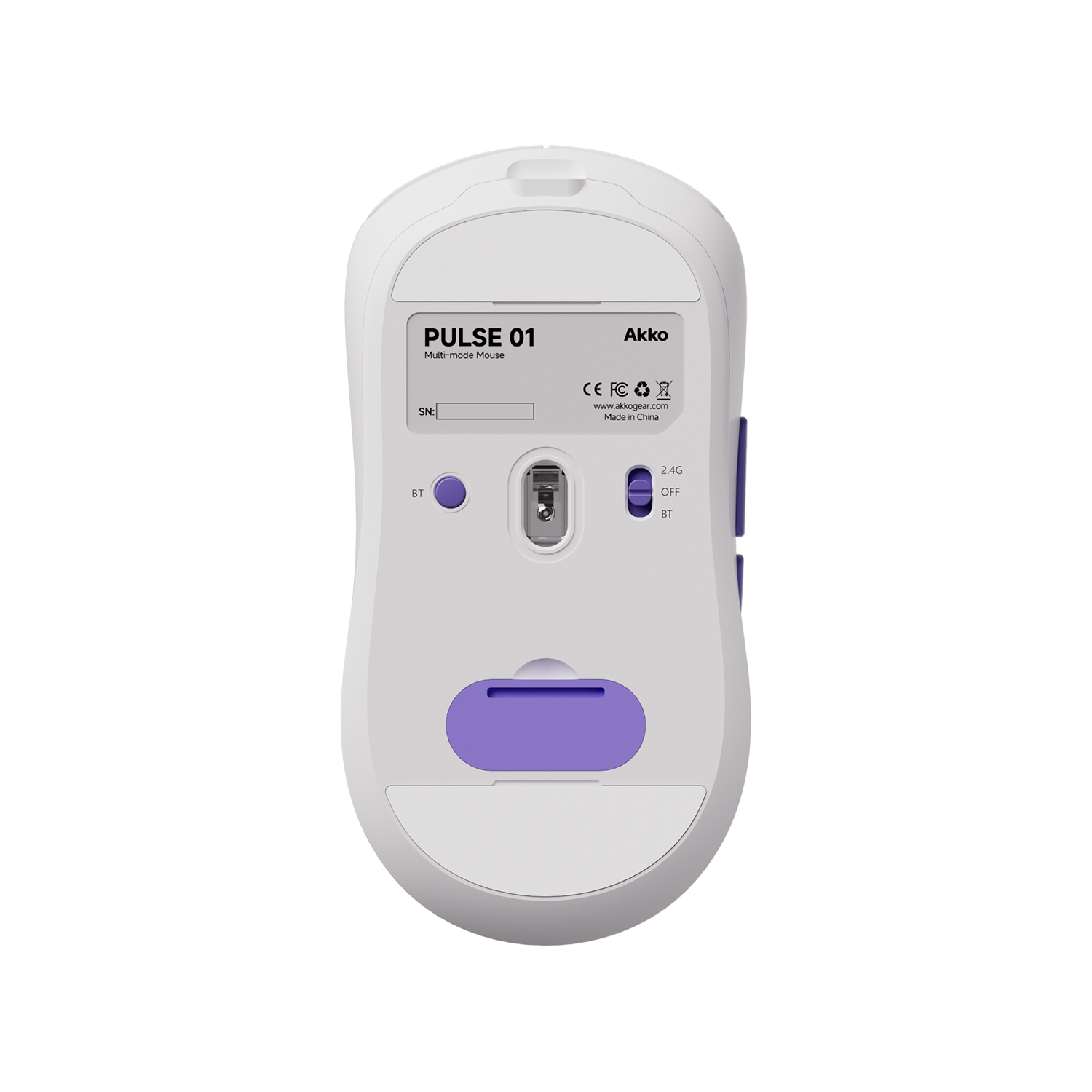
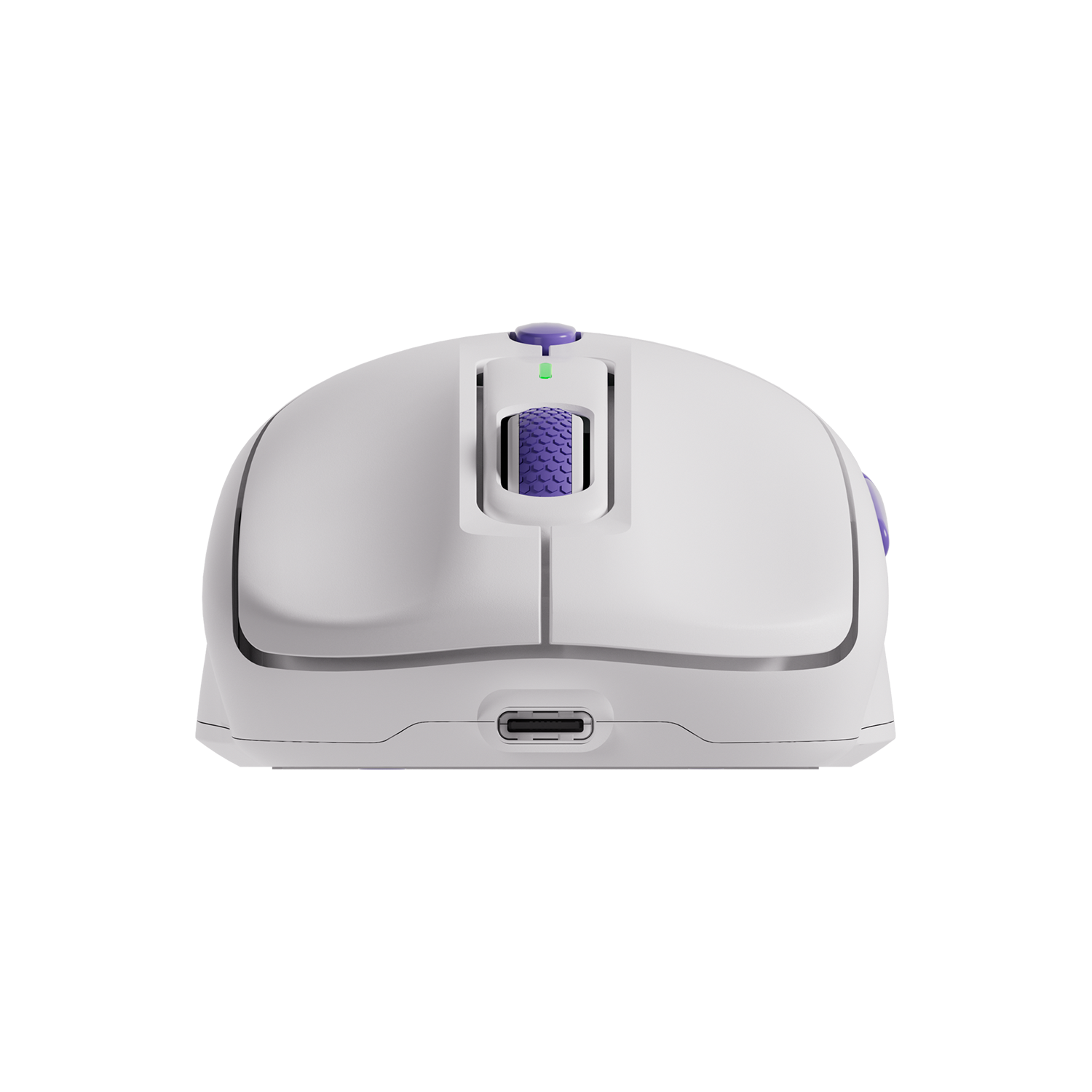
Supports wired (8K Hz), 2.4G wireless (8K Hz), and Bluetooth (250 Hz) connections, allowing seamless switching between high-performance gaming and everyday use.
[/et_pb_text][/et_pb_column][et_pb_column type=”1_2″ _builder_version=”4.22.1″ _module_preset=”default” global_colors_info=”{}”][et_pb_text _builder_version=”4.22.1″ text_font=”Poppins||||||||” text_font_size=”17px” text_line_height=”2em” header_font=”Poppins||||||||” header_2_font=”Poppins|800|||||||” header_2_font_size=”30px” header_2_line_height=”1.5em” header_3_font=”Poppins||||||||” header_4_font=”||||||||” max_width=”520px” max_width_tablet=”700px” max_width_phone=”700px” max_width_last_edited=”off|desktop” module_alignment=”center” custom_margin=”|||” custom_margin_tablet=”|0px||” custom_margin_phone=”|0px||” custom_margin_last_edited=”off|desktop” custom_padding=”20px|||” header_2_font_size_tablet=”30px” header_2_font_size_phone=”20px” header_2_font_size_last_edited=”on|phone” border_color_all=”RGBA(255,255,255,0)” border_width_top=”2px” locked=”off” global_colors_info=”{}”]
8K Hz Polling Rate
With an 8000Hz polling rate in both wired and 2.4G wireless modes, Akko Pulse 01 delivers up to 8× more data reports per second, significantly reducing latency for faster, more responsive control.
[/et_pb_text][et_pb_image src=”https://www.monsgeek.com/wp-content/uploads/2025/12/pulse01-mouse-9.avif” alt=”pulse01 mouse 9″ title_text=”pulse01 mouse 9″ _builder_version=”4.22.1″ _module_preset=”default” border_radii=”on|20px|20px|20px|20px” global_colors_info=”{}”][/et_pb_image][/et_pb_column][/et_pb_row][et_pb_row column_structure=”1_2,1_2″ _builder_version=”4.22.1″ _module_preset=”default” global_colors_info=”{}”][et_pb_column type=”1_2″ _builder_version=”4.22.1″ _module_preset=”default” global_colors_info=”{}”][et_pb_image src=”https://www.monsgeek.com/wp-content/uploads/2025/12/Pulse01-XQ-CT-2-GX-1-1.avif” alt=”Pulse01-XQ-CT-2-GX (1) (1)” title_text=”Pulse01-XQ-CT-2-GX (1) (1)” _builder_version=”4.22.1″ _module_preset=”default” border_radii=”on|20px|20px|20px|20px” global_colors_info=”{}”][/et_pb_image][et_pb_text _builder_version=”4.22.1″ text_font=”Poppins||||||||” text_font_size=”17px” text_line_height=”2em” header_font=”Poppins||||||||” header_2_font=”Poppins|800|||||||” header_2_font_size=”30px” header_2_line_height=”1.5em” header_3_font=”Poppins||||||||” header_4_font=”||||||||” max_width=”520px” max_width_tablet=”700px” max_width_phone=”700px” max_width_last_edited=”off|desktop” module_alignment=”center” custom_margin=”|||” custom_margin_tablet=”|0px||” custom_margin_phone=”|0px||” custom_margin_last_edited=”off|desktop” custom_padding=”20px|||” header_2_font_size_tablet=”30px” header_2_font_size_phone=”20px” header_2_font_size_last_edited=”on|phone” border_color_all=”RGBA(255,255,255,0)” border_width_top=”2px” locked=”off” inline_fonts=”Poppins” global_colors_info=”{}”]
Custom PAW3950 Sensor
Powered by the
Akko Custom PAW3950 sensor
, Pulse 01 delivers up to 30,000 DPI and 750 IPS for precise, responsive tracking across gaming and everyday use.
[/et_pb_text][/et_pb_column][et_pb_column type=”1_2″ _builder_version=”4.22.1″ _module_preset=”default” global_colors_info=”{}”][et_pb_text _builder_version=”4.22.1″ text_font=”Poppins||||||||” text_font_size=”17px” text_line_height=”2em” header_font=”Poppins||||||||” header_2_font=”Poppins|800|||||||” header_2_font_size=”30px” header_2_line_height=”1.5em” header_3_font=”Poppins||||||||” header_4_font=”||||||||” max_width=”520px” max_width_tablet=”700px” max_width_phone=”700px” max_width_last_edited=”off|desktop” module_alignment=”center” custom_margin=”|||” custom_margin_tablet=”|0px||” custom_margin_phone=”|0px||” custom_margin_last_edited=”off|desktop” custom_padding=”20px|||” header_2_font_size_tablet=”30px” header_2_font_size_phone=”20px” header_2_font_size_last_edited=”on|phone” border_color_all=”RGBA(255,255,255,0)” border_width_top=”2px” locked=”off” inline_fonts=”Poppins” global_colors_info=”{}”]
Dual Receiver Flexibility
Pulse 01 includes both 8K and 1K receivers. Simply swap the receiver and re-pair in the driver to switch modes. A USB extender ensures a stable, interference-resistant wireless connection.
[/et_pb_text][et_pb_image src=”https://www.monsgeek.com/wp-content/uploads/2025/12/Pulse01-XQ-CT-5-600×267-1.avif” alt=”Pulse01-XQ-CT-5″ title_text=”Pulse01-XQ-CT-5″ _builder_version=”4.22.1″ _module_preset=”default” border_radii=”on|20px|20px|20px|20px” global_colors_info=”{}”][/et_pb_image][/et_pb_column][/et_pb_row][et_pb_row column_structure=”1_2,1_2″ _builder_version=”4.22.1″ _module_preset=”default” global_colors_info=”{}”][et_pb_column type=”1_2″ _builder_version=”4.22.1″ _module_preset=”default” global_colors_info=”{}”][et_pb_image src=”https://www.monsgeek.com/wp-content/uploads/2025/12/Pulse01-XQ-CT-3-600×267-1.avif” alt=”Pulse01-XQ-CT-3-” title_text=”Pulse01-XQ-CT-3-” _builder_version=”4.22.1″ _module_preset=”default” border_radii=”on|20px|20px|20px|20px” global_colors_info=”{}”][/et_pb_image][et_pb_text _builder_version=”4.22.1″ text_font=”Poppins||||||||” text_font_size=”17px” text_line_height=”2em” header_font=”Poppins||||||||” header_2_font=”Poppins|800|||||||” header_2_font_size=”30px” header_2_line_height=”1.5em” header_3_font=”Poppins||||||||” header_4_font=”||||||||” max_width=”520px” max_width_tablet=”700px” max_width_phone=”700px” max_width_last_edited=”off|desktop” module_alignment=”center” custom_margin=”|||” custom_margin_tablet=”|0px||” custom_margin_phone=”|0px||” custom_margin_last_edited=”off|desktop” custom_padding=”20px|||” header_2_font_size_tablet=”30px” header_2_font_size_phone=”20px” header_2_font_size_last_edited=”on|phone” border_color_all=”RGBA(255,255,255,0)” border_width_top=”2px” locked=”off” inline_fonts=”Poppins” global_colors_info=”{}”]
Durable 100 Million Click Lifespan
Kailh GM X White Sword switch deliver clean clicks feeling, and the lifespan is up to 100 million clicks.
[/et_pb_text][/et_pb_column][et_pb_column type=”1_2″ _builder_version=”4.22.1″ _module_preset=”default” global_colors_info=”{}”][et_pb_text _builder_version=”4.22.1″ text_font=”Poppins||||||||” text_font_size=”17px” text_line_height=”2em” header_font=”Poppins||||||||” header_2_font=”Poppins|800|||||||” header_2_font_size=”30px” header_2_line_height=”1.5em” header_3_font=”Poppins||||||||” header_4_font=”||||||||” max_width=”520px” max_width_tablet=”700px” max_width_phone=”700px” max_width_last_edited=”off|desktop” module_alignment=”center” custom_margin=”|||” custom_margin_tablet=”|0px||” custom_margin_phone=”|0px||” custom_margin_last_edited=”off|desktop” custom_padding=”20px|||” header_2_font_size_tablet=”30px” header_2_font_size_phone=”20px” header_2_font_size_last_edited=”on|phone” border_color_all=”RGBA(255,255,255,0)” border_width_top=”2px” locked=”off” inline_fonts=”Poppins” global_colors_info=”{}”]
8 Adjustable DPI Levels
Pulse 01 offers 8 DPI settings from 400 to 30,000, delivering precise control across different screen resolutions and usage scenarios.
[/et_pb_text][et_pb_image src=”https://www.monsgeek.com/wp-content/uploads/2025/12/Pulse01-XQ-CT-4-600×267-1.avif” alt=”Pulse01-XQ-CT-4-” title_text=”Pulse01-XQ-CT-4-” _builder_version=”4.22.1″ _module_preset=”default” border_radii=”on|20px|20px|20px|20px” global_colors_info=”{}”][/et_pb_image][/et_pb_column][/et_pb_row][et_pb_row _builder_version=”4.22.1″ _module_preset=”default” global_colors_info=”{}”][et_pb_column type=”4_4″ _builder_version=”4.22.1″ _module_preset=”default” global_colors_info=”{}”][et_pb_text _builder_version=”4.22.1″ _module_preset=”default” text_font=”Poppins||||||||” text_font_size=”17px” header_font=”Poppins||||||||” header_2_font=”Poppins||||||||” header_3_font=”Poppins||||||||” global_colors_info=”{}”]
Compatible with Driver
[/et_pb_text][/et_pb_column][/et_pb_row][et_pb_row column_structure=”1_2,1_2″ _builder_version=”4.22.1″ _module_preset=”default” global_colors_info=”{}”][et_pb_column type=”1_2″ _builder_version=”4.22.1″ _module_preset=”default” global_colors_info=”{}”][et_pb_image src=”https://www.monsgeek.com/wp-content/uploads/2025/12/Pulse01-XQ-CT-6-GX-GX1-600×467-1.avif” alt=”Pulse01-XQ-CT-6-GX-GX1″ title_text=”Pulse01-XQ-CT-6-GX-GX1″ _builder_version=”4.22.1″ _module_preset=”default” width=”100%” module_alignment=”center” custom_padding=”8px|||||” border_radii=”on|20px|20px|20px|20px” global_colors_info=”{}”][/et_pb_image][/et_pb_column][et_pb_column type=”1_2″ _builder_version=”4.22.1″ _module_preset=”default” global_colors_info=”{}”][et_pb_text _builder_version=”4.22.1″ text_font=”Poppins||||||||” text_font_size=”17px” text_line_height=”2em” header_font=”Poppins||||||||” header_2_font=”Poppins|800|||||||” header_2_font_size=”30px” header_2_line_height=”1.5em” header_3_font=”Poppins||||||||” header_4_font=”||||||||” max_width=”520px” max_width_tablet=”700px” max_width_phone=”700px” max_width_last_edited=”off|desktop” module_alignment=”center” custom_margin=”|||” custom_margin_tablet=”|0px||” custom_margin_phone=”|0px||” custom_margin_last_edited=”off|desktop” custom_padding=”20px|||” header_2_font_size_tablet=”30px” header_2_font_size_phone=”20px” header_2_font_size_last_edited=”on|phone” border_color_all=”RGBA(255,255,255,0)” border_width_top=”2px” locked=”off” inline_fonts=”Poppins” global_colors_info=”{}”]
Pulse 01 Driver supports Windows operating system. It offers extensive customization options, including DPI Setting, Parameter Setting, Macro Setting, etc. These features provide a highly flexible and personalized gaming setup.
[/et_pb_text][et_pb_button button_url=”https://file.akkogear.com/Akko_AKKO_v1.0.0.43_2024.11.18_setup.zip” button_text=”Download” button_alignment=”center” _builder_version=”4.22.1″ _module_preset=”default” custom_button=”on” button_text_size=”22px” button_text_color=”#000000″ button_border_width=”3px” button_border_color=”#000000″ button_border_radius=”24px” button_letter_spacing=”0px” button_font=”Poppins|700|||||||” background_layout=”dark” box_shadow_style=”preset3″ global_colors_info=”{}”][/et_pb_button][et_pb_text _builder_version=”4.22.1″ text_font=”Poppins||||||||” text_font_size=”17px” text_line_height=”2em” header_font=”Poppins||||||||” header_2_font=”Poppins|800|||||||” header_2_font_size=”30px” header_2_line_height=”1.5em” header_3_font=”Poppins||||||||” header_4_font=”||||||||” max_width=”520px” max_width_tablet=”700px” max_width_phone=”700px” max_width_last_edited=”off|desktop” module_alignment=”center” custom_margin=”|||” custom_margin_tablet=”|0px||” custom_margin_phone=”|0px||” custom_margin_last_edited=”off|desktop” custom_padding=”20px|||” header_2_font_size_tablet=”30px” header_2_font_size_phone=”20px” header_2_font_size_last_edited=”on|phone” border_color_all=”RGBA(255,255,255,0)” border_width_top=”2px” locked=”off” inline_fonts=”Poppins” global_colors_info=”{}”]
Note:
To switch the wireless receiver, go to Settings > Pairing Tool, and click “Pair (Space)”.
[/et_pb_text][/et_pb_column][/et_pb_row][/et_pb_section][et_pb_section fb_built=”1″ admin_label=”Team” _builder_version=”4.18.1″ background_color=”RGBA(255,255,255,0)” custom_margin=”-50px||||false|false” custom_padding=”||0px|||” locked=”off” global_colors_info=”{}”][et_pb_row _builder_version=”4.22.1″ _module_preset=”default” global_colors_info=”{}”][et_pb_column type=”4_4″ _builder_version=”4.22.1″ _module_preset=”default” global_colors_info=”{}”][et_pb_text _builder_version=”4.22.1″ _module_preset=”default” text_font=”Poppins||||||||” text_font_size=”17px” text_line_height=”2em” text_orientation=”center” custom_padding=”||0px|||” global_colors_info=”{}”]
Elevate Your Desk Experience
[/et_pb_text][/et_pb_column][/et_pb_row][et_pb_row column_structure=”1_3,1_3,1_3″ _builder_version=”4.22.1″ _module_preset=”default” global_colors_info=”{}”][et_pb_column type=”1_3″ _builder_version=”4.22.1″ _module_preset=”default” global_colors_info=”{}”][et_pb_image src=”https://www.monsgeek.com/wp-content/uploads/2025/12/pulse01-mouse6.avif” alt=”pulse01 mouse6″ title_text=”pulse01 mouse6″ _builder_version=”4.22.1″ _module_preset=”default” border_radii=”on|20px|20px|20px|20px” global_colors_info=”{}”][/et_pb_image][/et_pb_column][et_pb_column type=”1_3″ _builder_version=”4.22.1″ _module_preset=”default” global_colors_info=”{}”][et_pb_image src=”https://www.monsgeek.com/wp-content/uploads/2025/12/pulse01.avif” alt=”pulse01″ title_text=”pulse01″ _builder_version=”4.22.1″ _module_preset=”default” border_radii=”on|20px|20px|20px|20px” global_colors_info=”{}”][/et_pb_image][/et_pb_column][et_pb_column type=”1_3″ _builder_version=”4.22.1″ _module_preset=”default” global_colors_info=”{}”][et_pb_image src=”https://www.monsgeek.com/wp-content/uploads/2025/12/pulse01-mouse-4.avif” alt=”pulse01 mouse 4″ title_text=”pulse01 mouse 4″ _builder_version=”4.22.1″ _module_preset=”default” border_radii=”on|20px|20px|20px|20px” global_colors_info=”{}”][/et_pb_image][/et_pb_column][/et_pb_row][/et_pb_section]
Dual Nordic Chips (nRF52840 + nRF52820)
Ensures ultra-responsive, power-efficient, and reliable wireless performance;
Pro Gaming Mouse equipped with the
PAW3950 sensor
;
Tri-mode connection: Impressive
8K Hz polling rate
(Adjustable) for both 2.4G and USB modes, 250 Hz for Bluetooth;
8 adjustable DPI levels
ranging from 400 to 30,000(400, 800, 1200, 1600, 3200, 6400, 10000, 30000).
Know the fit
[/et_pb_text][/et_pb_column][/et_pb_row][et_pb_row _builder_version=”4.22.1″ _module_preset=”default” global_colors_info=”{}”][et_pb_column type=”4_4″ _builder_version=”4.22.1″ _module_preset=”default” global_colors_info=”{}”][et_pb_text _builder_version=”4.22.1″ _module_preset=”default” text_font=”Poppins||||||||” text_font_size=”17px” header_font=”Poppins||||||||” header_2_font=”Poppins||||||||” header_3_font=”Poppins||||||||” global_colors_info=”{}”]
[/et_pb_text][et_pb_image src=”https://www.monsgeek.com/wp-content/uploads/2025/12/Pulse01-XQ-CT-SS-GX.gif” alt=”Pulse01-XQ-CT-SS-GX” title_text=”Pulse01-XQ-CT-SS-GX” align=”center” _builder_version=”4.22.1″ _module_preset=”default” width=”80%” border_radii=”on|15px|15px|15px|15px” global_colors_info=”{}”][/et_pb_image][et_pb_text _builder_version=”4.22.1″ _module_preset=”default” text_font=”Poppins||||||||” text_font_size=”17px” text_line_height=”2em” header_font=”Poppins||||||||” header_2_font=”Poppins||||||||” header_3_font=”Poppins||||||||” global_colors_info=”{}”]
Choose & use with care
Check PC compatibility. Compare the information published for the exact item and keep the product name or SKU for reference.
Compare layouts and fit. Check the selected listing and variant, including the supplied components before ordering.
Review included cables and parts. Use the directions supplied for your selected item. Contact support if an important detail is missing.
Follow the instructions supplied for the exact product. Features, limits and care directions are specific to the selected model.
Order preparation takes 1–3 business days, followed by 3–4 business days in transit: 4–7 business days in total. Standard shipping is free to the contiguous United States and DC, with no minimum order.
Request a return within 30 calendar days after delivery. We pay return shipping. After receipt, inspection and initiation of an approved refund take 5–7 business days.
Before you decide
Check PC compatibility. Read the actual item description, included parts and options. The collection contains different models; a feature stated for one item should not be assumed for every product.
Compare layouts and fit. Compare the dimensions and compatibility stated for the selected item with the space or equipment you intend to use. If a required measurement is absent, send the product name or SKU to [email protected] before purchasing.
Available choices are shown on the individual product page. Select the actual option labels before adding a variable product to your cart. Photos and specifications should be read together with that choice; availability is specific to the selected configuration.
Review included cables and parts. Follow the instructions supplied for the exact model. Do not assume that all items have the same materials, installation method, care directions or intended use.